Think. Act. Observe. Repeat. The four-step cycle that turns a language model into something that can actually get things done.
Ask me once, I'll tell you what to do, Ask me right, I'll go and do it too. Difference ain't the brain, it's the loop I'm in — Think, act, watch it land, then I go again.
I The Gap
Imagine asking your AI assistant to reschedule your 3pm meeting to tomorrow, check if the conference room is free, and send an updated calendar invite to everyone. Simple enough that you'd trust an intern with it.
A chatbot gives you a well-written paragraph about how you could do those things. An agent actually does them.
II The One-Shot LLM
A standard LLM interaction is one question in, one answer out. The model has no memory, no access to external systems, and no ability to take action.
Analogy
Imagine asking someone to plan a dinner party while they're locked in a room with no phone and no way to open the door. They can reason brilliantly — suggest a menu, draft invitations — but they cannot check the fridge, call the restaurant, or set the table. World-class dinner party planner. Zero dinners produced.
Three fundamental limitations follow:
No access to live data. Anything the model says about current state is either stale or fabricated.
No ability to take action. It can only describe actions, not perform them.
No way to self-correct. If its first response is wrong, it cannot check or try a different approach.
Try it yourself:
Try it yourself
Ask the LLM
Pick a task and watch the LLM respond. Pay attention to what it can and cannot actually do.
Select a scenario above to see how a standard LLM responds.
The LLM was articulate, confident, and completely incapable of doing anything. It described actions instead of performingthem — the colleague who replies "great question, here's what I'd do" and then does absolutely nothing. For products that need to interact with the real world, we need to give the LLM a body.
III The Loop
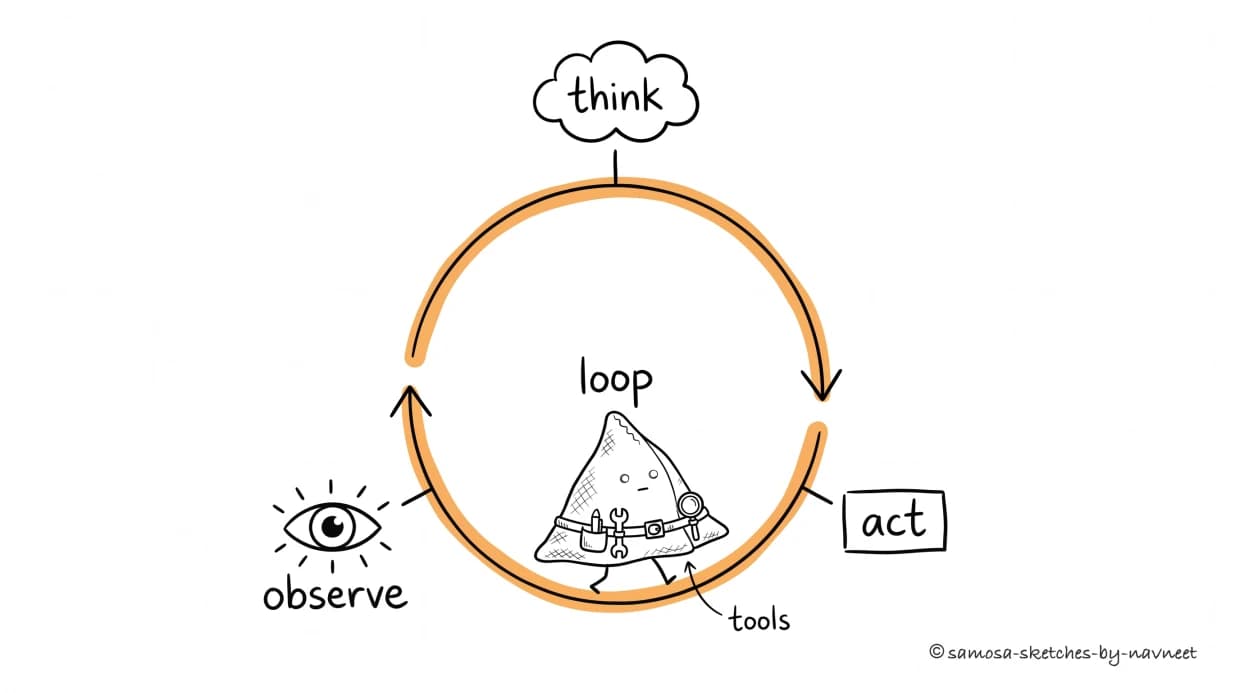
The agent loop: think, act, observe — then around again. The tools on the belt are how it acts on the world between turns.
The agent loop transforms an LLM from a one-shot oracle into an iterative problem-solver. Anthropic's engineering team, after shipping Claude Code and working with dozens of production deployments, landed on a core principle: what separates a working agent from a prototype isn't model capability — it's system design. Context management, error handling, and the loop itself matter more than raw intelligence. Four phases, repeated until the task is complete:
Think. The LLM examines the current context and reasons about what to do next.
Act. The agent executes a concrete action: calling an API, querying a database, running code.
Observe.The result comes back — data, an error, a confirmation — and gets fed into the LLM's context.
Decide. Is the task done? If yes, deliver the answer. If not, loop back to Think with new information.
Key Insight
The agent loop is why agents can handle ambiguity.They don't need perfect instructions upfront — they explore, adapt, and try again. This is fundamentally different from traditional software where every branch must be coded in advance.
Explore the loop in the interactive diagram below:
Interactive diagram
The Agent Loop
Click each phase to learn more, or press Play to watch the full cycle animate.
The Agent Loop
Click a phase to explore it.
IV An Agent in Action
Imagine you ask your AI agent: "Find the top 3 bugs by user impact from Sentry, summarize them, and post to #engineering on Slack."
Loop 1 — Gather. The agent queries the Sentry API for recent issues sorted by frequency, getting back 10 issues with titles and error counts.
Loop 2 — Refine.Frequency alone isn't user impact. The agent makes a second call to get unique users affected for the top 5 issues.
Loop 3 — Deliver. It ranks the top 3, writes a markdown summary, and posts it to Slack.
Builder Tip
No developer hard-coded this sequence. The agent figured out the steps — including the non-obvious second API call. This is the difference between a workflow (pre-defined steps) and an agent (dynamic steps determined at runtime).
Walk through this scenario step by step:
Walkthrough
Agent in Action
Click "Next Step" to reveal each step of the agent's reasoning and actions.
Ready—Step 0 of 12
Press "Next Step" to begin the walkthrough.
Takeaway
Three loops. Four tool calls. One final output. No human had to open Sentry, squint at a dashboard, or remember the Slack channel name. The agent started with a broad request and navigated to a specific outcome, making judgment calls along the way.
V When to Use What
Agents are powerful — and slow, expensive, and unpredictable. The engineering equivalent of calling in a specialist when a bandaid would do. It's also worth knowing where agents actually work today: Anthropic's analysis of millions of agent interactions found that roughly 50% of all agentic tool calls are software engineering tasks. Every other domain — BI, customer service, sales, finance — is in the single digits each. Coding dominates because outputs are machine-checkable, tools are already API-first, and a meaningful unit of work fits inside an agent's attention budget. Use the right tier:
Approach
When to use
Example
Tradeoff
Simple Prompt
Self-contained, no external data needed
Summarize a doc, draft an email
Fast & cheap, but no actions
Workflow
Known steps, deterministic routing
Classify ticket → route → draft reply
Reliable, but rigid
Agent
Open-ended, dynamic decision-making
Investigate why a metric dropped
Powerful, but slower & pricier
Key Insight
The decision comes down to one question: how much ambiguity is there?If the task is predictable, use a simpler approach. If it requires exploration and judgment, that's where agents shine.
VI What's Next
The agent loop is the heartbeat of every AI agent — but it's only as useful as the actions the agent can take. Right now we've been hand-waving about "tool calls" and "API requests." In Part 2, we'll get specific.
You'll learn how tools are defined and exposed to the LLM, how the model decides which tool to call, and the design patterns that make tool use reliable. Anthropic's Barry Zhang puts it bluntly: "Build skills, not agents" — treat each tool as a discrete, testable capability, and let the loop orchestrate them. The loop gives agents their rhythm. Tools give them their reach.
Test your understanding
Article Recap
5 questions covering the key concepts from this article.
1 of 5
A team builds a support bot on a frontier LLM. It drafts helpful replies, but a human still clicks "Send," looks up order info, and issues refunds. Is this an agent?